

AI productivity software with employee analytics
Prediction, coaching and early warnings, rather than another dashboard to interpret.
Worktivity runs machine learning over the work patterns your team already generates and surfaces what a manager cannot see by eye: a burnout risk building over three weeks, a schedule fighting someone's peak hours, a workflow quietly costing the team a day a month.
14-day free trial · No credit card required
What the AI layer actually does
Eight capabilities that turn activity data into decisions. Each one is generated automatically, so nobody has to build a report.
AI Productivity Coach
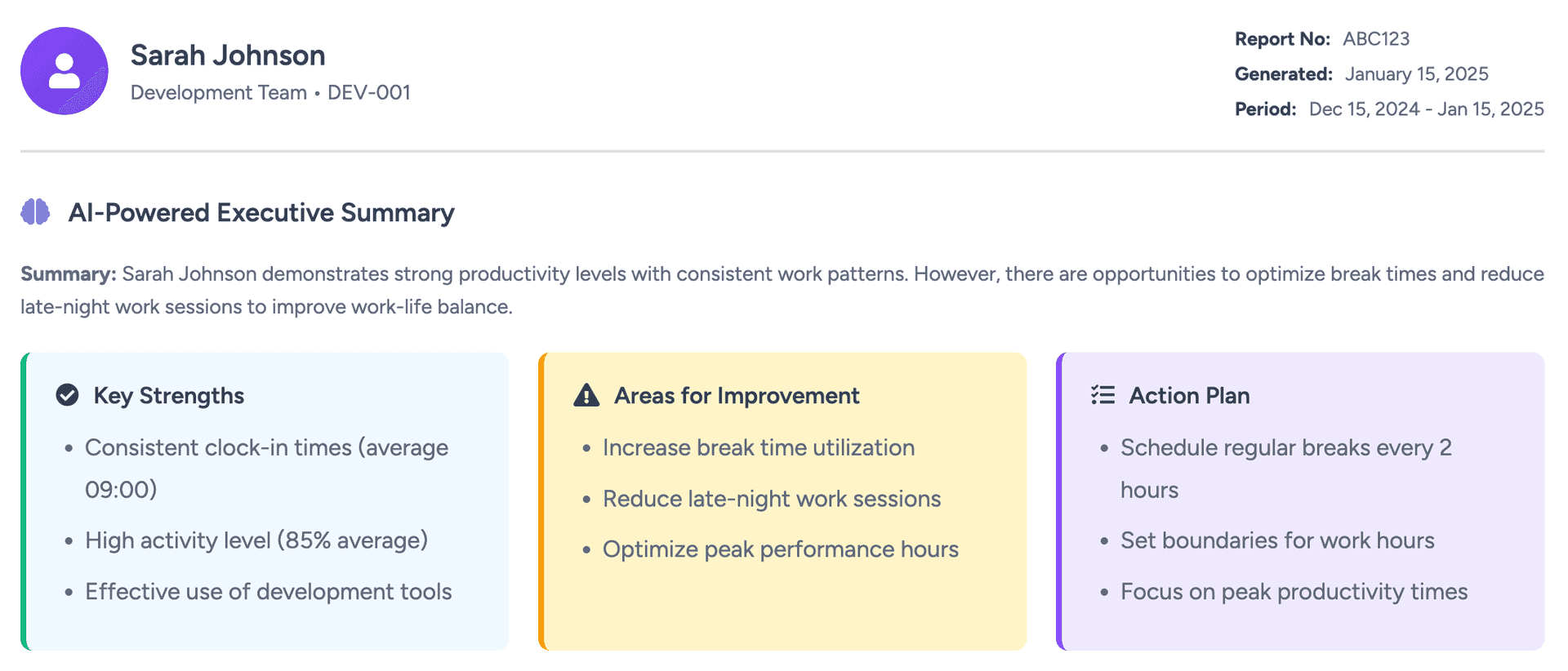
A per-employee coach that reads work patterns, wellness signals and output, then writes a plain-language report with a short action plan. The employee sees it first; managers get the summary.
Predictive productivity analytics
Historical patterns become a forecast. Worktivity projects where a person's or a team's output is heading, so you can intervene in week two instead of week six.
Burnout risk detection
Hours worked, break behavior, late-night sessions and streaks without recovery are scored into a burnout indicator, with an explanation of exactly what drove the score.
Personalized recommendations
Every suggestion is tied to one person's own data: move deep work to the morning, cut the afternoon context switching, protect two no-meeting blocks a week.
Automated insight generation
The analysis runs continuously and publishes what changed, why it matters and what to do about it. No exports, no pivot tables, no weekly ritual.
Pattern recognition
The model learns what normal looks like in your organization, which is what makes the abnormal legible: a team whose focus time collapsed, a process that only works for half the group.
Performance optimization
Optimization suggestions ranked by expected impact, so you can see which workflow change buys back the most hours and which team needs capacity first.
Work pattern analysis
Start and finish times, peak hours, consistency and recovery mapped per person and per team, so schedules can be built around how people actually work.
Why AI changes the answer, not just the interface
Reporting tells you what happened. These five things are what a model adds on top.
Insight past the average
Averages hide the interesting cases. Pattern analysis finds the person whose week fell apart and the team whose throughput doubled, and explains both.
Problems found while they are cheap
Forecasting moves the conversation forward in time. Overload, retention risk and slipping output become visible long before they show up in a resignation letter.
Analysis that maintains itself
No analyst, no spreadsheet, no monthly assembly job. The reporting layer regenerates itself as new data arrives.
Development that fits the individual
Coaching is specific by construction, because the advice comes from that employee's own record rather than a generic best-practice list.
Decisions with the evidence attached
Executive summaries carry the underlying numbers, so headcount, tooling and process calls can be defended in the room where they get questioned.
What sets Worktivity's AI apart
Four properties that matter once the novelty of an AI badge wears off.
It finds correlations people do not
Relationships between habits, hours and output rarely survive eyeballing. The model tests them continuously across the whole population, not on whatever sample someone had time to look at.
It gets better as it runs
Accuracy rises with the dataset. Six months in, the baseline is your organization's own rather than an industry default.
Intelligence that scales flat
The same analysis covers ten people or ten thousand. Understanding a larger workforce does not cost proportionally more attention.
Employees see their own analysis
The coach report belongs to the person it describes. Individual detail is purposeful rather than incidental, which is what keeps an AI layer from reading as surveillance.
What teams report after adopting AI productivity software
Figures from Worktivity customers who acted on the coaching output rather than filing it.
Up to 25% more output
Teams that implement the schedule and workflow changes the coach recommends recover meaningful hours per person each week.
40% lower burnout risk
Early wellness warnings let managers redistribute load before people break, which shows up as fewer sudden absences and resignations.
70% less time spent analyzing
Reporting that used to take a day a month is generated on its own, so the time goes into acting on it instead.
Where AI productivity analysis pays off first
Sectors with knowledge work, variable output and enough data volume for a model to learn from.
Technology & software development
Sprint velocity, review latency and deep-work fragmentation are all pattern problems. The model finds which of them actually predicts a missed release.
Data-driven organizations
Companies already instrumented for analytics get workforce data in the same shape as their product data, which makes it usable in existing planning cycles.
Consulting & professional services
Utilization forecasting matters more than utilization reporting. Predicting a bench week two weeks out is worth more than counting it afterwards.
Healthcare & medical services
Rota fatigue accumulates invisibly across shift patterns. Burnout scoring catches the accumulation that a single roster review cannot.
Financial services & banking
High-scrutiny environments need the reasoning behind a score, not just the score. Every recommendation carries its supporting data.
Marketing & creative agencies
Creative throughput is bursty by nature, so averages mislead. Pattern analysis separates a genuinely unproductive week from a normal trough.
Related Worktivity guides
Neighboring topics, in case you arrived here from a slightly different question.
Employee Activity Monitoring
App, website and input-level visibility with a searchable activity history.
Learn moreEmployee Productivity Monitoring
Measurement, goals and dashboards for the productivity of individual employees.
Learn moreEmployee Productivity Software
The full platform: tracking, analytics, coaching and workload balance in one place.
Learn more
AI productivity software questions
The questions buyers ask before running a model over their team's data.
What is AI productivity software?
Software that applies machine learning to employee work data to measure productivity, forecast trends and recommend changes. The difference from ordinary reporting is that it produces conclusions and predictions rather than charts you have to interpret.
How does Worktivity's AI actually work?
The desktop agent records activity, app and website usage and working hours. Models learn the normal pattern for each person and team, then flag deviations, project trends and generate a written coach report with recommended actions.
Does the AI make decisions about employees?
No. Everything it produces is a recommendation with the supporting data attached. Promotion, performance and disciplinary decisions stay with managers, and employees can read the same report their manager sees.
How accurate is the analysis?
Accuracy improves as the dataset grows, because the baseline shifts from a generic model to your organization's own patterns. Predictions come with the evidence behind them, so you can judge each one rather than trust it blindly.
Can it really detect burnout?
It detects the measurable precursors: rising hours, shrinking breaks, late-night sessions and long stretches without recovery. That is a risk indicator rather than a diagnosis, and it is designed to prompt a conversation, not replace one.
How much does AI productivity software cost?
Worktivity starts at $3.99 per user per month and the AI features are part of the platform rather than a separate add-on. There is a 14-day free trial and no card is required to start.
Which industries get the most from it?
Knowledge-work sectors with enough data volume for a model to learn from: technology, consulting, agencies, financial services, healthcare administration and any organization already making decisions from data.
Is AI productivity data secure?
Data is encrypted in transit and at rest, access is role-scoped, and the platform is operated in line with GDPR. Employees can view their own analysis, which is part of running an AI layer people accept.
Put a model to work on your productivity data
Start the 14-day trial, install the agent on a handful of machines and read your first coach reports within a week.
14-day free trial · No credit card required