

Employee activity monitoring that shows what actually ran
Applications, websites, active time and activity levels, all recorded, categorized and searchable.
Worktivity records what happens on company machines and turns it into something you can query: which applications were open and for how long, which sites were visited, and when input activity was real rather than the screen simply being on.
14-day free trial · No credit card required
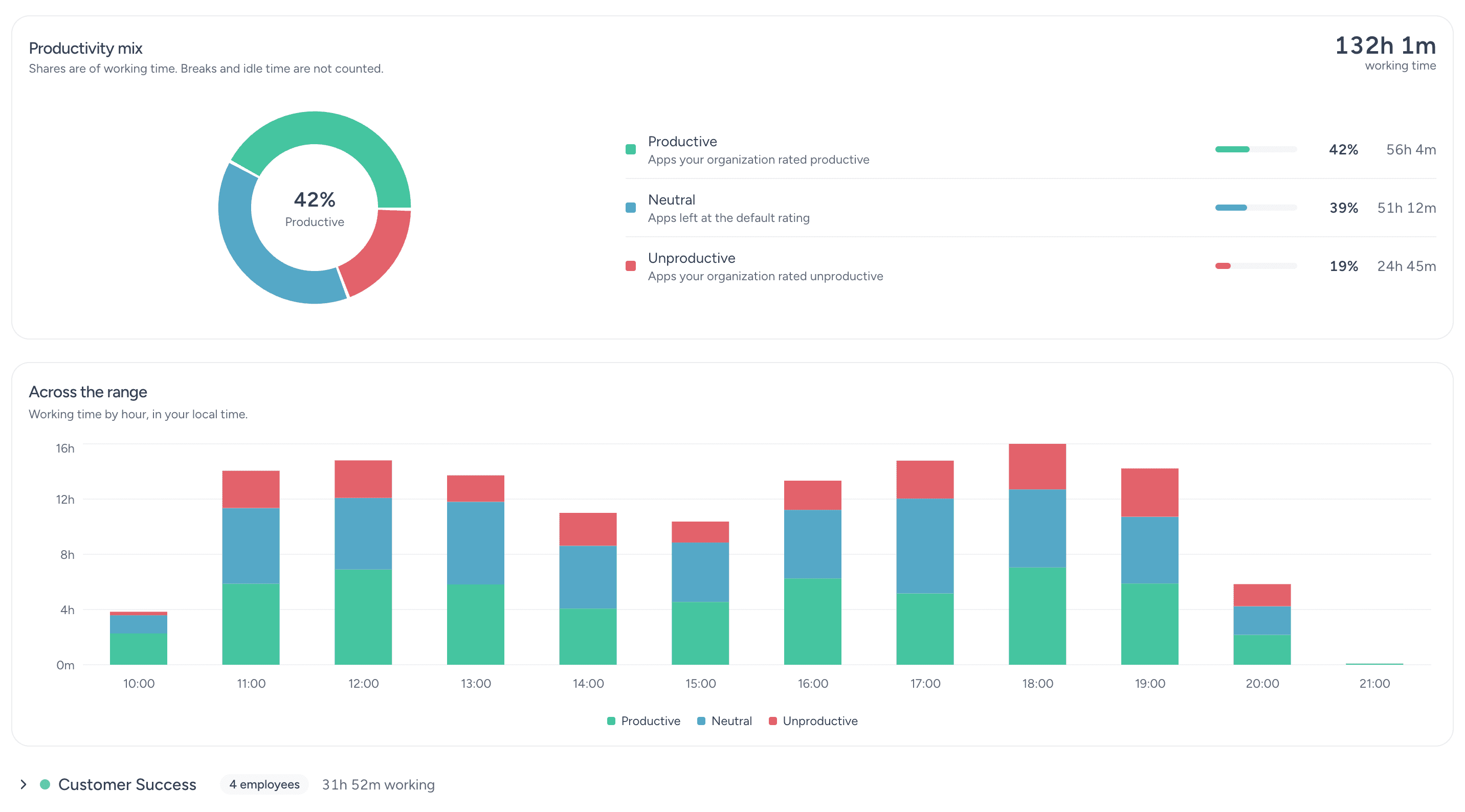
What activity monitoring captures
Eight layers of visibility, from a single application session up to an organization-wide audit trail.
Application usage tracking
Every application, the time it held focus and whether it counts as productive for that role. The by-product is a license audit: software nobody opens stops getting renewed.
Website and URL monitoring
Sites visited, time on each, categorized by productivity. Enough to separate research from drift without reading anyone's browsing history line by line.
Real-time activity view
A live picture of who is working, on what, right now. Useful for coverage, and for spotting someone stuck before they say so.
Keyboard and mouse activity
Input intensity distinguishes active work from a machine left unlocked. Worktivity counts activity levels rather than keystroke content. There is no keylogger.
Activity level metrics
Active-time ratios and intensity scores turn raw sessions into a comparable number, so activity can be discussed with evidence instead of impressions.
Activity history and logs
A searchable record of applications, sites and sessions, retained for the period your policy requires. This is what makes an investigation possible after the fact.
Activity reports and analytics
Scheduled and ad-hoc reports on tool usage, time allocation and activity patterns, at person, team or department level.
Security and compliance monitoring
Access to sensitive applications is logged, unusual patterns are flagged, and the audit trail is exportable for compliance reviews.
What visibility is worth
Activity data pays for itself in five fairly unglamorous ways.
You know what your tools are doing
The distribution of application time is usually a surprise. It shows which tools earned their place and which are being paid for out of habit.
Accountability without check-ins
When activity is visible and everyone knows the rules, the daily status meeting stops being the only way to know where things stand.
License spend that matches usage
Seat counts drift upward and never back down. Usage data gives you the evidence to cut the seats nobody has opened in ninety days.
An audit trail that exists
When something goes wrong, whether it is a leak, a dispute or a compliance question, the difference between a guess and an answer is whether the activity log was there.
Distractions you can name
Vague concern about focus becomes a specific list of applications and sites, which is a conversation you can actually have.
How Worktivity approaches activity monitoring
Monitoring earns trust or destroys it depending on four design choices.
Transparent by default
Employees can see their own activity data. Covert monitoring produces short-term compliance and long-term attrition; visible monitoring produces neither surprise nor resentment.
Metrics, not content
Worktivity records which application had focus and how intense the input was. It does not capture keystroke content, and that boundary is what makes the data defensible.
Evaluation with evidence
Activity metrics replace impressions in performance conversations. That cuts both ways, which is precisely why employees tend to accept them.
Configurable to your policy
Capture depth, retention period and exclusions are settings rather than fixed behavior, because monitoring rules differ by jurisdiction and by role.
What activity monitoring changes
The three outcomes customers cite most often after the first quarter.
Accountability that holds
Visible activity data settles most disagreements about workload and effort before they turn into escalations.
Lower software spend
Unused licenses surface immediately. For most teams this alone covers a meaningful share of the subscription cost.
Fewer security surprises
Logged access to sensitive systems means unusual behavior is noticed in days rather than discovered during an audit.
Who runs activity monitoring
Sectors where either tool spend or data access makes visibility non-optional.
IT & technology companies
Large tool estates, expensive licenses and sensitive repositories. Activity data covers cost control and access review at the same time.
Marketing & advertising agencies
Creative tool usage maps directly onto client work, which makes activity data the raw material for accurate project costing.
Consulting & professional services
Billable work needs a defensible record. Application-level activity substantiates what was done, for whom and when.
Customer support & contact centers
Agent tooling is standardized, so deviations in activity patterns are meaningful signals about quality and about training gaps.
Financial services & banking
Access to customer data has to be logged and reviewable. Activity monitoring supplies the trail regulators expect.
Remote & hybrid teams
The office signals are gone: nobody can see who is at their desk or who looks stuck. Activity data is the substitute, and it works the same from any location.
Related Worktivity guides
Neighboring topics, in case you arrived here from a slightly different question.
Employee Productivity Monitoring
Measurement, goals and dashboards for the productivity of individual employees.
Learn moreEmployee Productivity Software
The full platform: tracking, analytics, coaching and workload balance in one place.
Learn moreHybrid Workforce Management
One platform and one standard for in-office and remote employees alike.
Learn more
Employee activity monitoring questions
What buyers and works councils ask before an activity monitoring rollout.
What is employee activity monitoring?
Software that records computer activity, including applications used, websites visited and active versus idle time, then turns it into reports. It answers what happened on company machines, in a form you can search.
How does employee activity monitoring work?
A lightweight agent runs on each machine and records which application has focus, which sites are visited and how intense keyboard and mouse input is. That data syncs to your dashboard and becomes reports and searchable logs.
Does it record keystrokes or read messages?
No. Worktivity measures input intensity to distinguish active work from an idle machine. It does not capture keystroke content and it does not read the contents of messages or documents.
What exactly gets tracked?
Application usage and focus time, website visits and time on site, active versus idle time, activity levels, and session start and stop. Everything is attributed to a user and a time window.
Is employee activity monitoring legal?
In most jurisdictions yes, provided employees are informed, the purpose is legitimate and the data collected is proportionate. Worktivity is built for the transparent case: employees can see their own data.
How much does activity monitoring software cost?
$3.99 per user per month, with a 14-day free trial and no card required to start. Activity monitoring is part of the platform rather than a separate module.
Can it help cut software costs?
Yes, and this is usually the fastest measurable return. Usage data shows which licenses are genuinely used, which makes the renewal conversation straightforward.
Which industries use activity monitoring?
Technology companies, BPO and support operations, agencies, healthcare administration, financial services and any organization with regulated data access or a large software estate.
See what is actually running on your machines
Install the agent on a handful of computers and you will have your first full activity picture inside a week.
14-day free trial · No credit card required