

An Upwork-style time tracker for contractors outside Upwork
The same kind of proof of work, for direct clients and the teams that hire contractors.
Upwork's Time Tracker and Work Diary are built for hourly contracts on Upwork, and for those contracts they are the right tool. When you work with a contractor or a client directly, there is no Work Diary. Worktivity gives you a timeline of tracked hours with screenshots and activity, a weekly timesheet and a per-user price instead of a service fee on each contract.
14-day free trial · No credit card required
What you get for direct contractors
Eight capabilities that cover tracking, proof and invoicing.
A timeline of the working day
Hours are recorded from the contractor's computer and shown per person and per day, with work, break and idle time kept apart.
Screenshots at an interval you set
Optional captures every 1 to 60 minutes, each beside the application in front and the activity level of that minute. Your plan sets the shortest interval.
Activity level per minute
The share of each minute in which the keyboard or mouse was in use. What was typed and where it was clicked is never recorded.
A weekly timesheet
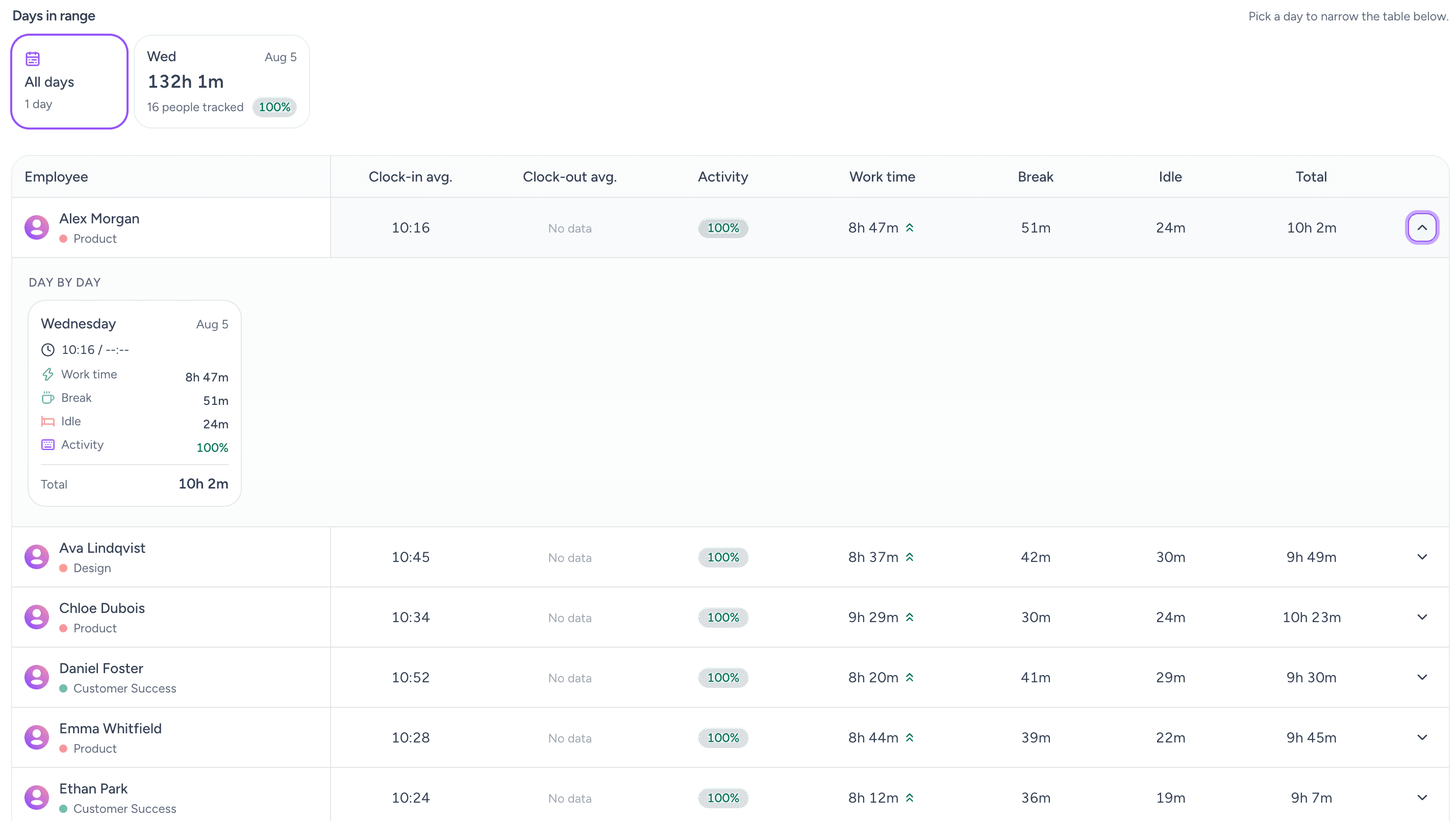
Pick a week and see each person's hours per day, with clock-in, clock-out, working time, breaks and idle time.
Manual time with approval
Work done away from the computer is added as a manual time entry with a reason. It counts once an owner, a co-owner or the person's manager approves it.
Export for invoicing
Export the timesheet as xlsx for payroll or an invoice. Export is included on Growth and Pro.
Rates, payouts and invoices
On Pro, hourly pay rates turn tracked hours into what each person is owed, and the same module issues PDF invoices to your own customers.
Invite by e-mail
The person paying creates the workspace, invites each contractor by e-mail and each contractor installs the app. Nobody needs a marketplace account.
Upwork's tracker and Worktivity, compared
They solve different problems. This is where each one applies.
| Topic | Upwork Time Tracker | Worktivity |
|---|---|---|
| Where it applies | Hourly contracts on Upwork. | Work with clients and contractors outside Upwork, plus your own staff. |
| Proof of work | Work Diary with screenshots and activity for the tracked time. | A timeline with optional screenshots, activity level per minute and idle time. |
| Who sets it up | The contract on Upwork. | The person paying creates the workspace and invites each contractor by e-mail. |
| What it costs | Upwork takes a service fee on each contract. | A per-user subscription from $3.99 per user a month. No share of what you pay. |
| Timesheets and invoicing | Hours feed billing on the Upwork contract. | A weekly timesheet with xlsx export on Growth and Pro, and pay rates and invoices on Pro. |
Why teams use it for direct contractors
Five things it settles when there is no marketplace in between.
Proof of work you can show
A contractor's hours come with the screenshots and activity behind them, which is what a client asks for when an invoice is questioned.
No share of what you pay
Worktivity is priced per user per month. It does not take a percentage of what you pay a contractor.
One tool for contractors and staff
Contractors and employees can sit in the same workspace, in different teams with different settings.
A weekly rhythm
A weekly timesheet per person turns the Friday question of how many hours it was into a screen you open.
Control over what is recorded
Screenshots can be switched off for one person, or blurred where your plan includes blur, so a senior contractor and a new hire need not share the same settings.
Where this differs from Upwork
Four differences, stated plainly.
It is not a marketplace
Worktivity does not find contractors, hold funds or move money. It records time and turns it into timesheets, rates and invoices.
It does not replace Upwork on Upwork contracts
If the contract is on Upwork, use the Upwork app: its Work Diary is part of that contract. Worktivity is for the work that happens outside it.
Built for the side that pays
The workspace belongs to the person paying. Contractors see their own hours and, where you allow it, their own screenshots.
Pricing is per user
Plans are per user per month and published on the pricing page, with a 14-day free trial and no credit card.
What it changes for a direct engagement
Practical effects once the work is outside a marketplace.
Invoices that hold up
Hours, screenshots and activity for the same period sit together, so the invoice and the evidence match.
Fewer status calls
The person paying sees hours as they are recorded instead of asking for an update.
A fair record for both sides
Contractors can be shown the same hours their client sees, where you allow it, so the invoice is not a surprise to either side.
Who uses it for contractors
Teams that pay people by the hour outside a marketplace.
Agencies with a freelance bench
Freelancers hired per project sit in the same workspace as the core team.
Software teams
Contract developers whose hours are billed to a client project.
Staff augmentation
Placed specialists whose hours the end client wants evidence for.
Support and virtual assistants
Part-time support and assistant roles paid by the hour.
Design and content studios
Freelance designers and writers paid hourly on retainer projects.
Small businesses hiring abroad
Owners who hire hourly help in other countries and want a record of the hours.
Related Worktivity guides
Neighboring topics, in case you arrived here from a slightly different question.
Time Tracking Software
Automatic hours, project allocation and billable-time capture without timesheets.
Learn moreRemote Employee Monitoring
Visibility across distributed teams, with privacy settings that make it survivable.
Learn moreWorkforce Management Software
Attendance, scheduling, leave, working-time records and payout calculation in a single system.
Learn more
Upwork time tracker alternative: questions
What people ask when they move work outside Upwork.
Can I use Worktivity instead of the Upwork time tracker?
Not on an Upwork hourly contract. Those contracts rely on Upwork's own Time Tracker and Work Diary, so use the Upwork app there. Worktivity is for work you do with clients and contractors outside Upwork.
Is Worktivity affiliated with Upwork?
No. Upwork is a trademark of Upwork Inc. Worktivity is not affiliated with Upwork.
Who sets up the workspace?
The person or company paying for the work. They create the workspace, invite each contractor by e-mail and each contractor installs the app.
Are screenshots taken of contractors?
Only if the workspace owner switches screenshots on. The interval, blur and who can see the captures are the owner's choice, and a contractor can be shown their own captures if the owner allows it.
What does it cost?
Plans are per user per month and published on the pricing page, with a 14-day free trial and no credit card. There is no share of what you pay a contractor.
Can I export hours to invoice a client?
Yes. The timesheet exports as xlsx on Growth and Pro. On Pro, pay rates and an invoice module turn tracked hours into amounts and PDF invoices.
Can a client log in to review a contractor's hours?
Not as a separate client login. The workspace owner and the managers they choose see the hours, screenshots and activity, and reports can be exported and shared.
Which computers does it run on?
The desktop app runs on Windows, macOS and Linux.
Track direct contractors with proof of work
Fourteen days free, no credit card. Invite one contractor, run a week and see what the timesheet looks like.
14-day free trial · No credit card required
Upwork is a trademark of Upwork Inc. Worktivity is not affiliated with Upwork.