

News & trends
Ask AI and MCP: your Worktivity data, in plain language
Worktivity now answers questions about your team, projects and time in plain language, and connects to ChatGPT, Claude and any MCP tool.

ActivTrak is one of the most respected names in workforce analytics. Deep dashboards, enterprise-grade reporting, and a privacy-conscious approach have earned it a loyal following among large organizations.
But at $10-19 per user per month, you're paying a premium. And a growing number of teams are asking: can I get the same level of insight at a fraction of the cost? That's exactly where Worktivity enters the conversation offering AI-powered productivity analytics starting at $3.99/user/month.
Worktivity is purpose-built as workforce analytics software, giving you ActivTrak-level insight at a fraction of the price.
We compared them across 8 categories. Here's what we found.
Workforce analytics tools solve a critical problem for modern companies: turning raw work data into actionable insights. But most teams face a painful trade-off. Enterprise-grade analytics (ActivTrak, Teramind) deliver deep reporting but come with enterprise-grade pricing. Budget-friendly tools (basic time trackers) keep costs down but leave you guessing about what's really happening.
The question is whether you actually need to make that trade-off anymore. Worktivity was built to challenge it — delivering AI-powered analytics that rival enterprise platforms at a price point that works for startups, agencies, and growing teams.
Let's see how they compare head to head.
|
Category |
Worktivity |
ActivTrak |
|
Starting Price |
$3.99/user/mo |
$10/user/mo |
|
Free Plan |
No (14-day trial) |
Yes (3 users, limited) |
|
AI Coaching |
AI Productivity Coach |
AI coaching recommendations |
|
Burnout Detection |
Burnout AI (proactive) |
Utilization-based risk flags |
|
Focus Time Tracking |
Auto-detect deep work |
Yes — focus metrics |
|
Screenshots |
Yes + Timelapse |
No screenshots |
|
Productivity Score |
AI composite (0-100) |
Productivity metrics |
|
Leave Management |
Built-in |
No |
|
Payroll Integration |
Yes |
No |
|
Financial Analysis |
No |
Financial Loss Analysis |
|
Location Insights |
Basic |
Advanced (hybrid optimization) |
|
Privacy Approach |
Insight-driven, no keylogging |
Privacy-first, no keylogging |
|
Best For |
Growing teams, best value |
Enterprise analytics |
ActivTrak offers four tiers: a Free plan (limited to 3 users with basic features), Essentials at $10/user/month, Essentials Plus at $15/user/month, and Professional at $19/user/month. Enterprise pricing starts around $25-30+/user/month for large deployments.
The free plan is a nice touch for testing, but it's too limited for real use — 3 users, minimal data history, and no advanced analytics. Most teams will land on Essentials ($10) or Professional ($19) to get meaningful value.
Worktivity starts at $3.99/user/month with core features included from day one: activity tracking, screenshots, timelapse, AI productivity coaching, burnout detection, focus time tracking, leave management, and payroll integration. No critical features hidden behind premium tiers.
For a 50-person team, the annual cost comparison is dramatic:
|
Scenario (50 users/year) |
Worktivity |
ActivTrak |
|
Entry-level plan |
$2,394 |
$6,000 (Essentials) |
|
Mid-tier plan |
$3,594 |
$9,000 (Essentials+) |
|
Full-featured plan |
$4,794 |
$11,400 (Professional) |
|
Annual savings with WT |
— |
$3,606 - $6,606 |
Winner: Worktivity — 60-70% cheaper across every tier. For budget-conscious teams, the savings are hard to ignore — especially when Worktivity includes features like leave management and payroll that ActivTrak doesn't offer at any price.
This is ActivTrak's home turf. The platform offers some of the deepest workforce analytics dashboards in the market: team productivity benchmarks, location-based insights for hybrid teams, technology usage analysis, goal tracking aligned to business objectives, and a Financial Loss Analysis feature that converts productivity gaps into dollar amounts.
ActivTrak's Activity Alignment feature uses AI to map employee activities directly to business objectives — useful for large organizations that need to demonstrate ROI on workforce initiatives. The reporting depth is genuinely impressive and hard to match.
Worktivity's analytics take a different approach: fewer enterprise dashboards, more actionable daily insights. The AI-powered Productivity Score (0-100) gives every team member a composite metric based on active time, focus time, app usage, and task completion — weighted by role.
Where Worktivity shines is in translating data into action. Instead of presenting 50 different dashboard views, it surfaces the 3-4 insights that matter most right now: who's at risk of burnout, which team's focus time is declining, where workload is unbalanced. For managers who want answers rather than data exploration, this approach saves hours per week.
Winner: ActivTrak for depth, Worktivity for actionability — ActivTrak has richer dashboards and enterprise reporting. Worktivity is better at surfacing what matters without requiring you to become a data analyst.
ActivTrak uses AI primarily for analytics: behavioral trend analysis, Activity Alignment (mapping activities to objectives), and productivity coaching recommendations. Its virtual productivity coach gathers insights and generates personalized suggestions for managers. The AI is analytical — it tells managers what to do based on data patterns.
Worktivity's AI operates at two levels. The AI Productivity Coach works directly with employees — providing real-time nudges and suggestions based on their individual work patterns. This is fundamentally different from ActivTrak's approach, which channels AI insights through managers.
The Burnout AI is Worktivity's standout. While ActivTrak flags utilization-based risk (essentially "this person is working too much"), Worktivity's Burnout AI monitors compound signals — declining productivity scores, increasing idle time, longer hours without proportional output, deteriorating focus patterns — and alerts managers with actionable recommendations before burnout materializes.
The difference: ActivTrak's AI helps managers analyze. Worktivity's AI helps both managers and employees improve.
Winner: Worktivity — Employee-facing AI coaching and proactive burnout detection are genuine differentiators. ActivTrak's AI is solid but management-focused.
ActivTrak takes a privacy-first approach to monitoring. It tracks application and website usage, active vs. idle time, and productivity categorization — but deliberately avoids screenshots, keystroke logging, webcam capture, and email scanning. Privacy settings are enabled by default.
This makes ActivTrak one of the least invasive monitoring tools on the market, which is a genuine selling point for privacy-conscious organizations. The trade-off: no visual proof of work, which some industries and clients require.
Worktivity also avoids keystroke logging and webcam monitoring, but offers more visual tracking options: screenshots at configurable intervals and timelapse recordings that compress entire workdays into quick visual summaries. These are optional and can be disabled per team or individual.
For teams that need proof of work (agencies billing clients, contractors, compliance-driven industries), Worktivity's screenshot and timelapse options provide that capability without crossing into invasive territory. The timelapse approach is notably less intrusive than random screenshot capture — employees can review their own timelapse and it feels like a productivity review tool rather than surveillance.
Winner: Depends on your needs — ActivTrak wins for maximum privacy (no screenshots at all). Worktivity wins for teams that need visual proof of work alongside privacy-conscious monitoring.
ActivTrak is focused squarely on analytics and productivity — it doesn't include HR features like leave management, payroll integration, or attendance tracking. For these capabilities, you'll need separate tools (BambooHR, Gusto, ADP, etc.), adding to your total software cost and creating data silos.
Worktivity includes built-in leave management (request/approval workflows, automatic availability adjustments), payroll integration, attendance tracking, and workload distribution dashboards. This isn't a bolt-on — it's integrated into the productivity platform, so leave data automatically adjusts team availability metrics and workload calculations.
For growing companies, consolidating productivity monitoring and basic HR functions into one platform reduces tool sprawl, eliminates data silos, and saves $3-8/user/month on a separate HR tool.
Winner: Worktivity — Built-in leave management, payroll, and attendance eliminate the need for a separate HR tool. ActivTrak requires third-party solutions for all of these.
ActivTrak deserves credit here. Its no-screenshots, no-keystroke-logging, no-webcam approach makes it one of the most privacy-friendly monitoring tools available. Employees generally respond well to ActivTrak because it feels like a business analytics tool rather than a surveillance system. Privacy settings are on by default, and the platform is designed to filter out personal or non-work information.
Worktivity takes a similar philosophy but adds an employee empowerment layer. The AI Productivity Coach gives employees direct access to their own insights and suggestions — turning monitoring from something done to them into a tool they use for themselves. Employees can view their own productivity trends, focus time patterns, and energy curves.
Screenshots and timelapse, while available, are presented as optional productivity review tools rather than surveillance evidence. The key difference: ActivTrak protects privacy by limiting data collection. Worktivity protects privacy by sharing data with employees so monitoring becomes mutual.
Winner: Tie — Both tools take privacy seriously. ActivTrak minimizes data collection. Worktivity empowers employees with their own data. Different approaches, both effective.
ActivTrak has invested heavily in hybrid work features. Its Location Insights dashboard shows where employees work best (office, home, or hybrid), helps optimize office space utilization, and identifies productivity differences across work locations. For companies managing return-to-office policies, this data is valuable for making evidence-based decisions rather than arbitrary mandates.
Worktivity tracks location for attendance purposes and supports geolocation-based check-ins, but doesn't offer the same depth of location-based analytics as ActivTrak. Its strength for hybrid teams lies more in schedule flexibility, availability tracking, and workload balancing across time zones — practical coordination tools rather than location analytics.
Winner: ActivTrak — If hybrid work optimization and office space planning are priorities, ActivTrak's location intelligence is significantly more advanced.
ActivTrak is battle-tested at enterprise scale. Its Enterprise tier includes dedicated support, custom analytics, SSO/SAML, advanced security controls, and SLA guarantees. The Financial Loss Analysis and Activity Alignment features are specifically designed for large organizations that need to quantify productivity ROI at the executive level.
Worktivity handles growing teams well — case studies show successful deployments with 500+ employees. However, its enterprise features (custom SSO, dedicated support tiers, advanced security controls) are less mature than ActivTrak's. For companies under 500 employees, this won't be a limitation. For Fortune 500 deployments, ActivTrak has a more established enterprise playbook.
Winner: ActivTrak — For enterprise scale (500+ employees, enterprise security requirements), ActivTrak has the more mature infrastructure and support model.
|
Feature |
Worktivity |
ActivTrak |
|
Automatic Activity Tracking |
Yes |
Yes |
|
App & Website Monitoring |
Smart auto-categorize |
Yes — customizable |
|
Screenshots |
Yes + Timelapse |
No |
|
Screen Recording |
Timelapse only |
No |
|
Keystroke Logging |
No |
No |
|
Webcam Monitoring |
No |
No |
|
AI Productivity Coach |
Yes (employee-facing) |
Yes (manager-facing) |
|
Burnout Detection |
Burnout AI (proactive) |
Utilization risk flags |
|
Focus Time Tracking |
Auto-detect |
Yes |
|
Productivity Score |
AI composite (0-100) |
Productivity metrics |
|
Workload Distribution |
Real-time dashboards |
Team benchmarks |
|
Financial Loss Analysis |
No |
Yes |
|
Activity Alignment (OKR) |
No |
Yes (AI-powered) |
|
Location Intelligence |
Basic |
Advanced |
|
Leave Management |
Built-in |
No |
|
Payroll Integration |
Yes |
No |
|
Attendance Tracking |
Yes |
Limited |
|
Project Time Tracking |
Yes |
Limited |
|
Mobile App |
iOS & Android |
Limited |
|
Free Plan |
No (14-day trial) |
Yes (3 users) |
|
SSO/SAML |
Yes |
Yes (Enterprise) |
|
GDPR Compliant |
Yes |
Yes |
|
API Access |
Yes |
Yes |
|
Starting Price |
$3.99/user/mo |
$10/user/mo |
Companies switching to Worktivity from enterprise-priced tools report strong results:
These results demonstrate that you don't need to spend $10-19/user/month to get meaningful workforce analytics. The right AI-powered platform at the right price can deliver equivalent — or better — outcomes.
Is Worktivity really comparable to ActivTrak?
For core workforce analytics — activity tracking, productivity scoring, focus time, and workload distribution — yes. Where ActivTrak pulls ahead is in enterprise-grade reporting depth, location intelligence, and Financial Loss Analysis. Where Worktivity pulls ahead is in AI coaching, burnout detection, screenshots/timelapse, leave management, payroll, and price.
Does ActivTrak have a free plan?
Yes, but it's limited to 3 users with basic features and minimal data history. It's useful for testing but not viable for real team management. Worktivity offers a 14-day free trial of the full platform instead.
Can I switch from ActivTrak to Worktivity?
Yes. Historical data won't transfer, but Worktivity's onboarding team can help you set up equivalent dashboards and workflows. Most teams are fully operational within a week and have baseline comparison data within a month.
Which tool is better for remote teams?
Both work well for remote teams. Worktivity has an edge for remote teams that need visual proof of work (screenshots/timelapse) and built-in leave management. ActivTrak has an edge for hybrid teams that need location-based productivity analysis.
Does ActivTrak take screenshots?
No. ActivTrak deliberately avoids screenshots, screen recordings, and any visual monitoring. If your organization requires proof of work or visual activity records, Worktivity provides this through optional screenshots and timelapse.
Which tool handles burnout better?
Both address burnout, but differently. ActivTrak flags utilization risk based on hours worked. Worktivity's Burnout AI monitors compound signals (declining scores, increasing idle time, focus deterioration) and alerts proactively with specific recommendations. Worktivity's approach catches burnout earlier because it looks at patterns, not just volume.
ActivTrak is a premium workforce analytics platform that earns its reputation with deep reporting, location intelligence, and enterprise maturity. If your organization has 500+ employees, needs Financial Loss Analysis for executive reporting, or requires maximum analytics depth, ActivTrak delivers real value.
But for the majority of growing companies, Worktivity offers a stronger total package. AI coaching that works with employees — not just managers. Proactive burnout detection. Built-in leave management and payroll. Screenshots and timelapse for proof of work. All at 60-70% less cost.
The question isn't whether ActivTrak is good — it is. The question is whether the extra $6-15/user/month buys you enough additional value to justify the spend. For most teams, the answer is no.
See the full Worktivity vs ActivTrak comparison.
Try Worktivity free for 14 days at app.useworktivity.com
More from the same corner of the blog.
Worktivity now answers questions about your team, projects and time in plain language, and connects to ChatGPT, Claude and any MCP tool.
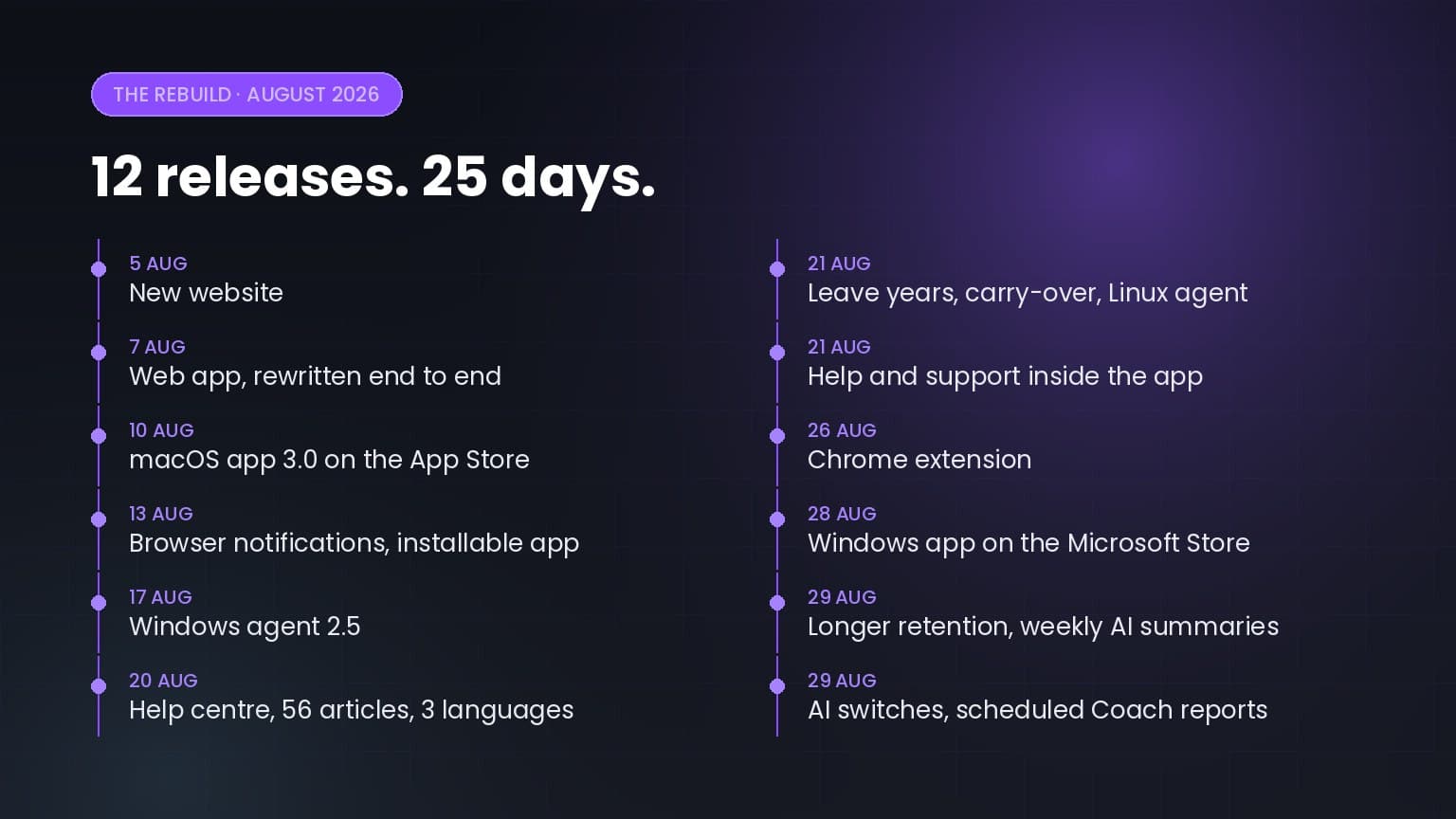
Twelve releases in twenty-five days: a rewritten web app, apps for macOS, Windows, Linux and Chrome, a help centre in three languages, and a…

5+ up-to-date statistics on hybrid and remote work productivity, RTO mandates, employee monitoring, burnout, and where the workday actually goes in…
Worktivity turns the activity your team already generates into a picture you can act on: automatic time tracking, productivity scores and payout-ready reports.
Free 14-day trial. No credit card required.