

News & trends
Ask AI and MCP: your Worktivity data, in plain language
Worktivity now answers questions about your team, projects and time in plain language, and connects to ChatGPT, Claude and any MCP tool.
The best ActivTrak alternative is the tool whose data collection, screenshot options and pricing terms match how your team works and what your employees will accept. A workforce analytics tool is software that records how time is spent on work and turns it into reports. Six questions separate the tools that fit a team of 10 to 200 people from the ones that do not: what is recorded, how screenshots work, what employees can see, how productivity is labelled, what the contract looks like, and whether the data reaches timesheets and project cost.
This guide is for owners and managers of remote or hybrid teams, and for agencies that sell time to clients. It states what ActivTrak publishes on its own pricing page, what Worktivity records according to its help centre, and where each tool stops. It does not rank vendors you have not tested.
ActivTrak's pricing page, checked on 23 October 2026, lists five plans billed per worker. Pricing and plan names change, so confirm them on the vendor's site before you decide.
The page states that paid plans are billed annually and that it currently offers only annual plans. It also states that paid support is required for more than 50 licences. Screenshots are listed as an add-on called Screen Details on the Work Activity Tracking and Workforce Management plans, and are not listed on Productivity Optimization.
The first check on any ActivTrak alternative is the written list of what the desktop agent records. A tool that cannot give you that list in one page is a tool your employees will distrust.
Worktivity publishes the list in its help centre. While a shift runs, the desktop app sends one record per minute: status (working, on a break or idle), activity level, the application in the foreground, the site host if that application is a browser, the number of displays, and the project, task and work note the employee selected. Activity level is a count of seconds with keyboard or mouse input, never the keys themselves.
Worktivity does not collect typed text, window titles, full web addresses, clipboard contents, files, camera or microphone. Window titles are not a setting that can be switched on: the field does not exist in the data the app sends. The consequence is a limit you should accept knowingly: Worktivity cannot tell you which document someone had open, only which application.
Read the full list in What does Worktivity collect, and what does it not? and ask every vendor on your shortlist for the equivalent page.
Screenshots are the feature that most often decides whether a rollout survives. The useful question is whether the choice sits with you and whether a screenshot can be readable at all.
In Worktivity, screenshots have three states and the organization chooses: off, blurred, or as they are. Blurring happens on the employee's own computer at the moment of capture, before anything is uploaded, so a readable version never exists on the server. A blurred screenshot still shows which application was open and roughly what kind of work it was, but names, messages and customer records are not readable.
Worktivity does not claim to take no screenshots. The accurate statement is that screenshots are optional, can be turned off or blurred, and that employees can be given access to their own captures. Teams that handle customer data, medical records or legal documents usually land on blurred. The setup is described in Can I blur screenshots so content is not readable?
When you evaluate ActivTrak or any other alternative, ask the same three things: can screenshots be switched off entirely, can they be blurred before upload, and is the screenshot feature a separate paid add-on on the plan you need.
An employee who can see the data collected about them treats the tool as a measurement instead of surveillance. This is the most practical answer to the HR objection that people do not want to be tracked.
In Worktivity, every employee has a My activities screen in the sidebar that needs no switch, and organization settings control whether employees can also see and delete their own screenshots. Owners and co-owners see the whole organization, and managers see their own team. Ask each vendor who can see what, and whether the employee sees the same numbers their manager sees.
A productivity percentage is only as honest as the rule behind it. The rule should be something you can read and change.
Worktivity does not use a hidden score. Each working minute takes the rating of the application that was in the foreground: productive, neutral or unproductive. Applications nobody has rated stay neutral. The share you see is working minutes in a class divided by all working minutes, and breaks and idle minutes are left out of the denominator. The rating list belongs to your organization, so a design agency and a support team can rate the same application differently. The rules are in How is the productivity split worked out?
Ask any alternative whether the labels are editable by you, what happens to applications nobody has rated, and whether a manager can see how a number was calculated.
The price per person is the smallest part of the answer. Billing term, history length and add-ons change the real cost more than the headline number.
Work through your own headcount with the published figures. For example, 30 people on a plan listed at $15 per worker per month come to $5,400 over a year, and ActivTrak states that paid plans are billed annually. Add the cost of any add-on you need, such as screenshots, and check how many months of history your plan keeps. Then repeat the same calculation for each alternative with its current pricing page, not with figures from an old comparison article.
For Worktivity, use the pricing page on the site, because plan prices are set there and not in this article.
Agencies, software houses and consultancies need more than a picture of activity. They need hours per project and cost per project, because those decide quotes and invoices.
Worktivity turns the same recorded time into timesheets, a project cost report and AI Productivity Coach analysis, so the person who approves hours and the person who prices the next quote work from one dataset. If you sell time to clients, test whether the alternative you are considering can answer one concrete question: which project earned money last month and which one did not.
If your priority is a different job, such as measuring AI adoption or discovering workflows to automate, compare against the plan built for that job. Worktivity's scope is time, tasks, applications, timesheets, project cost and the Productivity Coach, and it does not cover those two jobs.
A two-week test with a small group tells you more than any feature table. Follow these steps.
For a feature-by-feature view of the two tools, read Worktivity vs ActivTrak. To see how Worktivity records, reports and explains work for teams of 10 to 200 people, start with the workforce analytics software page, then start a free trial and run the two-week test above with your own team.
More from the same corner of the blog.
Worktivity now answers questions about your team, projects and time in plain language, and connects to ChatGPT, Claude and any MCP tool.
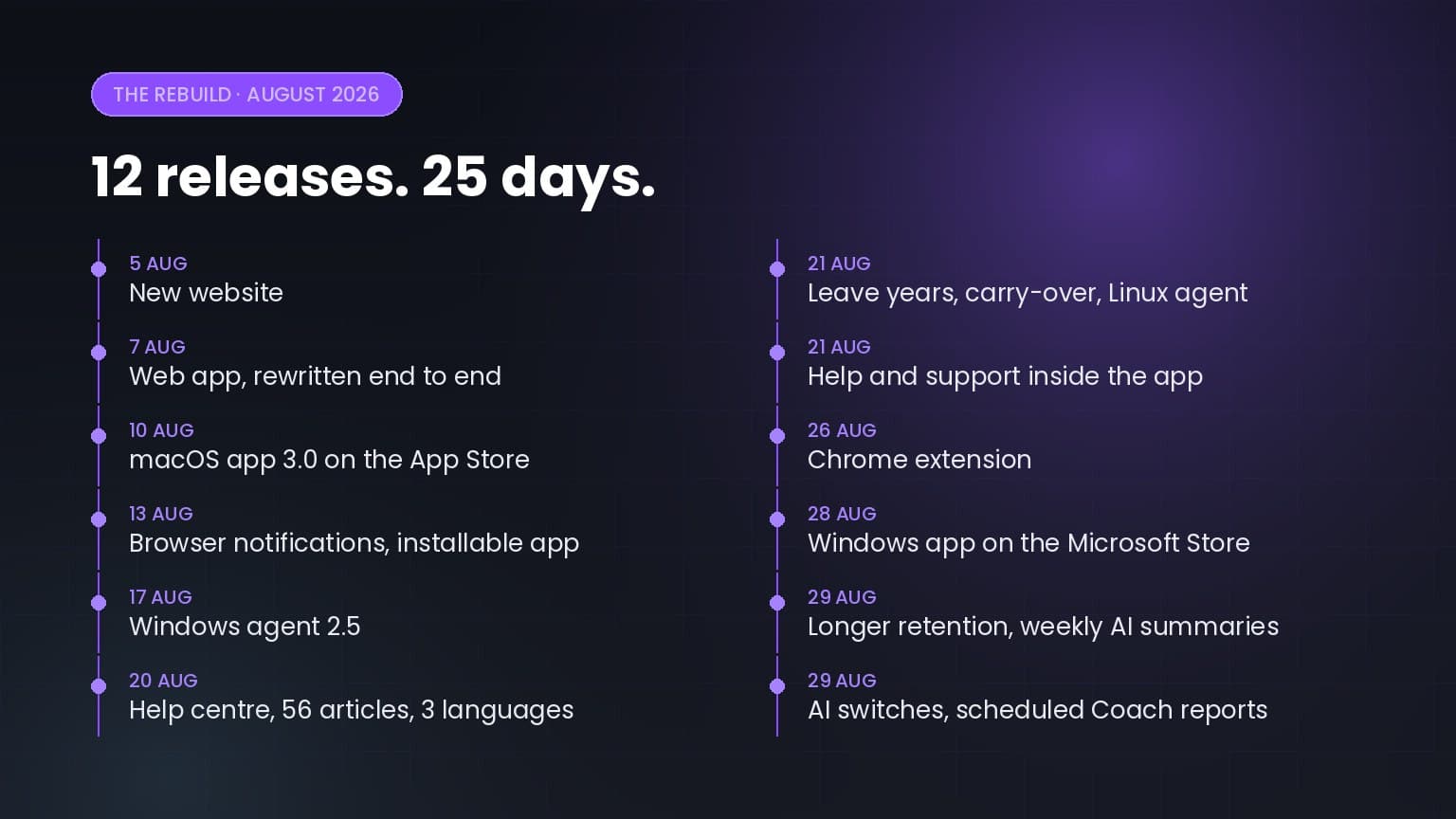
Twelve releases in twenty-five days: a rewritten web app, apps for macOS, Windows, Linux and Chrome, a help centre in three languages, and a…

5+ up-to-date statistics on hybrid and remote work productivity, RTO mandates, employee monitoring, burnout, and where the workday actually goes in…
Worktivity turns the activity your team already generates into a picture you can act on: automatic time tracking, productivity scores and payout-ready reports.
Free 14-day trial. No credit card required.