

News & trends
Ask AI and MCP: your Worktivity data, in plain language
Worktivity now answers questions about your team, projects and time in plain language, and connects to ChatGPT, Claude and any MCP tool.
Worktivity Team7 min read

Choosing the right employee monitoring software can feel like comparing phone plans — the features look similar until you check the fine print (and the invoice). Hubstaff has been a go-to name in time tracking for years, but newer tools like Worktivity are challenging the status quo with AI-powered coaching, unlimited screenshots, and a price tag that makes finance teams smile. Worktivity is built as full workforce analytics software, not just a timer.
This comparison breaks down exactly where each tool stands so you can make a decision based on what actually matters: features you'll use, support you'll get, and a price that makes sense at scale.
Hubstaff is an established time tracking and workforce management platform founded in 2012. It offers GPS tracking, payroll, scheduling, and screenshot monitoring across four pricing tiers. It's built for teams that need location-based tracking and project budgeting alongside time tracking.
Worktivity is a modern employee monitoring and time tracking platform that focuses on AI-powered productivity analytics, unlimited screenshots, and streamlined workforce management. It's designed for remote, hybrid, and in-office teams that want deep productivity insights without the enterprise price tag.
| Feature | Worktivity | Hubstaff |
|---|---|---|
| Automatic Time Tracking | Yes | Yes |
| Screenshots | Unlimited (all plans) | Limited — up to 3/10 min on lower plans; 10/10 min requires add-on ($2.50/seat) |
| AI-Powered Coach & Analytics | Yes — built-in AI productivity coaching | No — basic activity % only |
| Timelapse Video Recording | Yes | No |
| App & Website Monitoring | Yes | Yes (Team plan and above) |
| Task Tracking | Yes | Add-on ($2.50/seat) on lower plans |
| Timesheets | Yes | Yes |
| Payroll & Billing | Yes | Yes (Team plan and above) |
| Leave Tracking | Yes | Yes |
| GPS Tracking | No | Yes |
| Scheduling | No | Yes |
| Developer API | Yes (REST API) | Yes |
| Integrations | Growing ecosystem | 30+ integrations (Asana, Jira, Slack, QuickBooks) |
| Privacy Controls | Configurable monitoring, employee self-view, break respect | Configurable screenshot frequency |
| Security | End-to-end encryption, GDPR compliant, regular audits | SOC 2, HIPAA (Enterprise) |
| Free Trial | Yes — no credit card required | Yes — 14 days |
This is where the gap becomes hard to ignore. Here's what you'll pay per user per month when billed monthly:
| Plan Tier | Worktivity | Hubstaff |
|---|---|---|
| Entry-level | $3.99/user | $7.00/user (Starter) |
| Mid-tier | Included in base pricing | $9.00/user (Grow) |
| Advanced | Included in base pricing | $12.00/user (Team) |
| Enterprise | Custom | $25.00/user |
The math is simple: Worktivity at $3.99/user is 67% more affordable than Hubstaff's most comparable plan (Team at $12/user) — and that's before considering Hubstaff's add-on costs.
Hubstaff's base plans look reasonable, but many of the features teams actually need are either locked behind higher tiers or sold as add-ons at $2.50/seat each. Want more than 3 screenshots every 10 minutes? That's an add-on. Need task management on the Starter plan? Another add-on. Want behavioral insights? Pay for the Insights add-on.
A Hubstaff Grow plan ($9/user) with Screenshots and Insights add-ons costs $14/user — more than 3x what Worktivity charges for everything included.
Worktivity bundles unlimited screenshots, AI analytics, task tracking, and payroll into a single plan. No nickel-and-diming, no feature gates.
For a 50-person team (monthly billing):
| Worktivity | Hubstaff (Team) | |
|---|---|---|
| Monthly Cost | $199.50 | $600.00 |
| Annual Cost | $2,394 | $7,200 |
| Annual Savings with Worktivity | — | $4,806 |
That's nearly $5,000 back in your budget every year — enough to fund a new tool, hire a contractor, or invest in training.
Pros:
Cons:
Pros:
Cons:
Choose Worktivity if:
Choose Hubstaff if:
Both tools get the basics right — time tracking, screenshots, and activity monitoring. But the value proposition diverges sharply when you look at what's included versus what costs extra.
Hubstaff is a solid, mature platform. It works well for teams that need GPS tracking and scheduling, and its integration ecosystem is broader. But the add-on pricing model means the advertised price rarely reflects what you'll actually pay.
Worktivity takes a different approach: pack everything — AI coaching, unlimited screenshots, timelapse recordings, task tracking, payroll — into one affordable plan. At $3.99/user, it's 67% cheaper than a comparable Hubstaff setup, and you're not constantly hitting paywalls for features you assumed were included.
For most remote and hybrid teams focused on productivity monitoring and workforce analytics, Worktivity delivers more value per dollar — and it's not particularly close.
Ready to see the difference? Start your free Worktivity trial — no credit card required.
For the full breakdown, see our Worktivity vs Hubstaff comparison.
Yes. Worktivity starts at $3.99/user/month with all features included. Hubstaff's Team plan — which is the closest feature match — costs $12/user/month. That's a 67% difference. Factor in Hubstaff's add-ons for extra screenshots and insights, and the gap widens further.
Worktivity offers unlimited screenshots on every plan, plus timelapse video recording. Hubstaff limits screenshots to 3 per 10 minutes on lower plans and charges an additional $2.50/seat/month for up to 10 screenshots per 10 minutes.
Worktivity's AI Coach analyzes work patterns, identifies productivity trends, and provides actionable coaching recommendations. It goes beyond simple activity percentage tracking to help teams understand how they work and where they can improve. Hubstaff does not offer an equivalent feature.
For most remote and hybrid teams, yes. Worktivity covers time tracking, screenshot monitoring, app/website usage, task tracking, timesheets, and payroll. The main exception is if your team requires GPS tracking or shift scheduling — those are Hubstaff features Worktivity doesn't currently offer.
Worktivity offers a Developer REST API that allows custom integrations with your existing tools. While Hubstaff has more out-of-the-box integrations (30+), Worktivity's API gives developers flexibility to connect with any platform.
Hubstaff offers HIPAA compliance and SOC 2 certification on its Enterprise plan ($25/user), which may be required in regulated industries like healthcare. Worktivity provides GDPR compliance and end-to-end encryption, which covers most enterprise security needs at a fraction of the cost. Your compliance requirements will determine which is the better fit.
Hubstaff offers a Free plan limited to 1 user. Worktivity offers a free trial with no credit card required, giving you access to the full feature set before committing.
Stop overpaying for features that should come standard. Worktivity gives you AI-powered coaching, unlimited screenshots, and full workforce analytics at $3.99/user — 67% less than Hubstaff.
No credit card required. Set up in under 2 minutes.
More from the same corner of the blog.
Worktivity now answers questions about your team, projects and time in plain language, and connects to ChatGPT, Claude and any MCP tool.
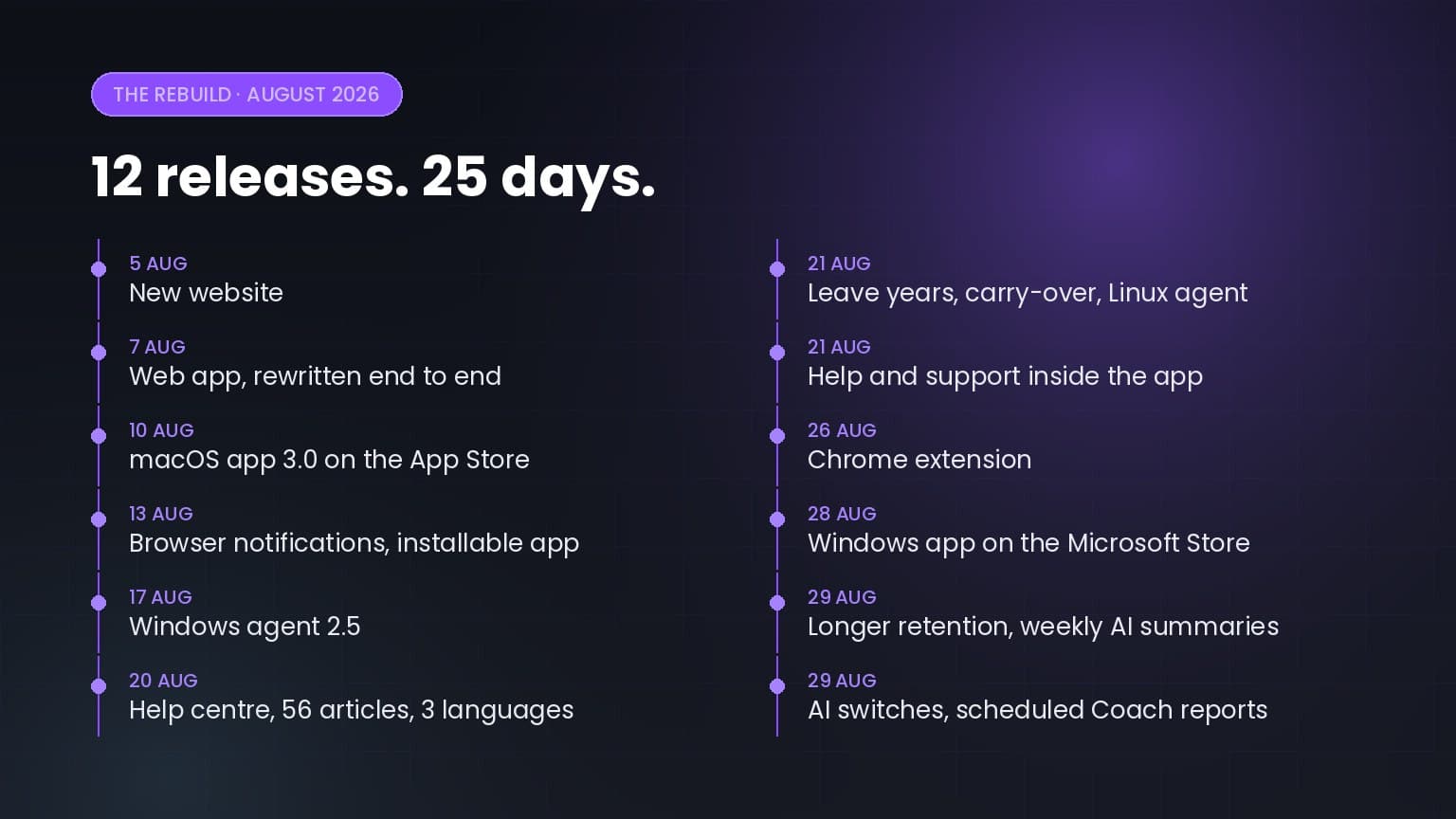
Twelve releases in twenty-five days: a rewritten web app, apps for macOS, Windows, Linux and Chrome, a help centre in three languages, and a…

5+ up-to-date statistics on hybrid and remote work productivity, RTO mandates, employee monitoring, burnout, and where the workday actually goes in…
Worktivity turns the activity your team already generates into a picture you can act on: automatic time tracking, productivity scores and payout-ready reports.
Free 14-day trial. No credit card required.