

News & trends
Ask AI and MCP: your Worktivity data, in plain language
Worktivity now answers questions about your team, projects and time in plain language, and connects to ChatGPT, Claude and any MCP tool.
Worktivity Team16 min read
![Cover image for Workforce Analytics: The Complete Guide for Data-Driven Teams [2026]](/_next/image?url=https%3A%2F%2Fworktivity.b-cdn.net%2Fworktivity-public%2FW%2FUploads%2FBlogPostImage%2Fc9e07da85c07426f897fed8ebe9ab31f.png&w=3840&q=75)
The workforce analytics market is projected to reach $7.12 billion by 2034 — up from $2.72 billion in 2026. Yet most companies still make workforce decisions based on gut feeling.
Here's the disconnect: organizations that adopt workforce analytics report $13.01 in return for every $1 spent, achieve 25% quarter-on-quarter productivity gains, and see a 50% drop in attrition. Meanwhile, teams relying on intuition struggle with high turnover, inefficient resource allocation, and burned-out employees they didn't see coming.
Workforce analytics isn't just for enterprise HR departments with six-figure budgets anymore. In 2026, AI-powered tools make it accessible to any team with 5 or 500 people — starting at $3.99/user/month. This guide covers everything you need to know: what workforce analytics actually is, which metrics matter, how to implement it step by step, and which tools deliver real results.
Every company generates mountains of workforce data — login times, app usage, project hours, meeting frequency, break patterns, task completion rates. But fewer than 32% of organizations have adopted analytical forecasting to make sense of it. The rest are sitting on a goldmine of insights they never extract.
Without workforce analytics, teams face a predictable set of problems:
The core issue is simple: you can't improve what you can't measure. Workforce analytics bridges the gap between "we think" and "we know."
Workforce analytics is the practice of collecting, analyzing, and interpreting employee-related data to make better business decisions. It goes beyond basic HR metrics (headcount, tenure) to include productivity patterns, engagement signals, workload distribution, collaboration dynamics, and predictive insights about future performance and retention.
There are four maturity levels of workforce analytics:
|
Level |
Type |
What It Does |
Example |
|
1 |
Descriptive |
Reports on what happened |
"Last month, average productive hours were 6.2/day" |
|
2 |
Diagnostic |
Explains why it happened |
"Productivity dropped 15% because of 3 new tool rollouts" |
|
3 |
Predictive |
Forecasts what will happen |
"Employee X has a 78% burnout risk based on patterns" |
|
4 |
Prescriptive |
Recommends actions |
"Redistribute 3 tasks from Team A to Team B this week" |
Most teams start at Level 1 (descriptive) and that's perfectly fine. Even basic descriptive analytics — knowing how your team actually spends time — delivers massive ROI compared to guessing. The key is starting, not starting perfectly.
Not all workforce metrics are equal. Some look impressive on dashboards but drive no action. Here are the 10 metrics that correlate with real business outcomes — and how to act on each one.
1. Productive Hours per Day
What: Hours spent on work-related applications and tasks vs. total logged hours.
Why: The gap between "hours worked" and "productive hours" reveals distractions, tool friction, and workflow inefficiencies.
Benchmark: 5.5-6.5 productive hours in an 8-hour day is healthy. Below 5 hours signals a systemic problem.
Action: If low, investigate top non-productive apps and meeting overload before assuming laziness.
2. Billable Utilization Rate
What: Percentage of total work hours that are directly billable to clients.
Why: The single most important profitability metric for service businesses. Every 5% improvement translates directly to revenue.
Benchmark: 65-75% for agencies and consultancies. Below 60% usually means a tracking or process problem.
Action: Compare against industry benchmarks. If low, audit non-billable activities for automation opportunities.
3. Focus Time Ratio
What: Percentage of work time spent in uninterrupted blocks of 60+ minutes.
Why: Deep work requires sustained focus. Teams with high focus time ratios produce higher-quality output and report lower stress.
Benchmark: 40-50% of the workday should be uninterrupted focus time.
Action: If below 30%, audit meeting schedules and implement "no-meeting" blocks.
4. Overtime and After-Hours Work
What: Hours worked outside standard business hours, tracked over weeks.
Why: Occasional overtime is normal. Consistent overtime is a burnout predictor. Analytics lets you spot the pattern before the resignation.
Benchmark: Less than 5% of total hours should be after-hours. Consistent overtime over 3+ weeks is a red flag.
Action: Flag team members with rising after-hours patterns and redistribute workload proactively.
5. Meeting Load
What: Hours spent in meetings per week, categorized by meeting type (1:1, team, client, all-hands).
Why: The average professional spends 31 hours per month in unproductive meetings. Analytics identifies which meetings add value and which are pure overhead.
Benchmark: Meetings should not exceed 30% of total work hours for individual contributors.
Action: Audit meetings exceeding 30 minutes with more than 5 attendees — these are the most likely to be unproductive.
6. Idle Time Ratio
What: Percentage of logged time with no detectable activity (no mouse, keyboard, or app interaction).
Why: High idle time doesn't always mean slacking — it can indicate waiting for approvals, blocked tasks, or unclear priorities.
Benchmark: 10-15% idle time is normal (thinking, planning, bio breaks). Above 25% needs investigation.
Action: Correlate idle time with task assignments to identify bottlenecks vs. disengagement.
7. Application and Website Usage Patterns
What: Which tools and websites team members use most, categorized as productive, neutral, or distracting.
Why: Reveals tool adoption rates, shadow IT, and potential workflow improvements.
Benchmark: 70%+ of app usage should be in productive categories during work hours.
Action: If a team spends 2+ hours daily on a tool you're paying for but isn't core, evaluate whether it's necessary.
8. Task Completion Velocity
What: Average time from task assignment to completion, tracked across projects and team members.
Why: Slowing velocity is an early warning for scope creep, skill gaps, or overloaded team members.
Benchmark: Varies by role. Track your own baseline and watch for trends, not absolute numbers.
Action: If velocity drops >15% over two weeks, check workload distribution and blocking dependencies.
9. Attendance and Availability Patterns
What: Start times, end times, break frequency, and presence consistency across the team.
Why: For remote and hybrid teams, understanding availability patterns helps coordinate collaboration and prevent isolation.
Benchmark: Consistency matters more than specific times. Erratic patterns often signal disengagement.
Action: Use patterns to optimize meeting scheduling and identify team members who may need support.
10. Team Collaboration Index
What: Frequency and depth of cross-team interactions — shared projects, communication patterns, and co-working time.
Why: Isolated team members are 3x more likely to leave within 6 months. Collaboration data reveals organizational silos before they cause problems.
Benchmark: Every team member should have regular interaction with at least 3 colleagues per week.
Action: If silos emerge, introduce cross-functional projects or pair working sessions.
Step 1: Define Your Objectives (Week 1)
Start with business questions, not tools. What are you trying to solve? Common starting points include reducing turnover, improving billable utilization, identifying burnout risk, or optimizing resource allocation. Pick 2-3 objectives maximum for your first implementation. Trying to measure everything at once leads to analysis paralysis and abandoned dashboards.
Step 2: Audit Your Current Data Sources (Week 1-2)
Map out what data you already have: time tracking records, project management tools, communication platforms, HR systems. Most teams discover they have more data than they realize — it's just scattered across 5-10 tools with no integration. Identify gaps where you need new data collection (e.g., if you have no time tracking at all, that's where to start). This audit also reveals data quality issues — incomplete records, inconsistent categories, and manual entry errors that need fixing.
Step 3: Choose and Deploy Your Analytics Tool (Week 2-3)
Select a tool that matches your maturity level. If you're starting from scratch, you need a tool that collects data automatically rather than one that only analyzes data you manually input. Worktivity excels here because it captures time, productivity, and activity data automatically in the background — no manual entry required. Deploy in a pilot group first (one team or department), not company-wide. This lets you refine categories, fix edge cases, and build internal champions before scaling.
Step 4: Communicate Transparently with Your Team (Week 3)
This is where most implementations fail. 72% of employees accept monitoring and analytics when it's transparent, but resistance skyrockets when tools are deployed secretly. Hold a team meeting explaining what you're measuring, why, and how the data will be used (process improvement, not punishment). Share dashboards with employees so they can see their own data. When people have access to their own analytics, they self-optimize — Worktivity's employee-facing AI Coach does exactly this.
Step 5: Analyze, Act, and Iterate (Week 4+)
Data without action is just surveillance. Establish a weekly rhythm: review dashboards every Monday, identify one actionable insight, implement a change, and measure the impact. Start small — "Team A's focus time dropped 20% this week; let's audit their meeting schedule" is a better starting point than building complex predictive models. As you build confidence and data history, gradually move up the maturity ladder from descriptive to diagnostic to predictive analytics.
The workforce analytics market is crowded, but tools vary dramatically in what they actually do. Some are pure HR/people analytics platforms (focused on hiring and retention), while others provide real-time productivity and operational analytics. Here's how the key players compare:
|
Tool |
Price/User/Mo |
Auto Data Collection |
AI Insights |
Employee-Facing |
Best For |
|
Worktivity |
$3.99 |
Yes (full) |
AI Coach + Burnout AI |
Yes |
Teams wanting real-time productivity + wellness analytics |
|
Visier |
Custom ($$$) |
No (imports) |
Advanced |
Limited |
Enterprise HR analytics and planning |
|
ActivTrak |
$10-19 |
Yes (partial) |
Productivity reports |
No |
Mid-size companies focused on monitoring |
|
Microsoft Viva |
$6-12 |
Yes (M365 only) |
Copilot insights |
Yes |
Teams already on Microsoft 365 |
|
Time Doctor |
$6.70+ |
Partial |
Basic |
No |
Monitoring-focused remote teams |
|
Hubstaff |
$4.99+ |
Partial |
No |
No |
Field teams with GPS tracking needs |
Why Worktivity for workforce analytics: Most enterprise analytics platforms cost $15-50+/user and require months of setup. Worktivity delivers real-time workforce analytics — automatic time tracking, productivity scoring, application usage patterns, burnout risk detection, and AI-powered recommendations — from day one, at $3.99/user/month. The employee-facing AI Coach turns analytics from a management surveillance tool into a personal productivity assistant, which drives adoption and data accuracy.
The ROI of workforce analytics isn't theoretical. Here's what organizations achieve with data-driven workforce management:
The #1 concern with workforce analytics is employee privacy. And it's a legitimate concern — analytics done wrong feels like surveillance, destroys trust, and drives away your best people. Here's how to get it right:
The bottom line: workforce analytics should make work better for everyone, not just management. When employees experience analytics as helpful rather than punitive, data quality improves, adoption increases, and the entire organization benefits.
Mistake #1: Measuring everything, acting on nothing
The most common failure mode. Teams deploy analytics, build beautiful dashboards, and then... nothing changes. Data without action is just overhead. Fix: For every metric you track, define a specific action threshold. "If focus time drops below 30%, we audit the meeting schedule" is an example of a metric tied to action.
Mistake #2: Deploying without employee buy-in
Surprise deployments of monitoring tools are the fastest way to destroy team trust. Even if the tool is genuinely helpful, the perception of secret surveillance poisons the entire initiative. Fix: Communicate openly before deployment. Run a pilot with volunteers. Share employee-facing features first. Build trust before scaling.
Mistake #3: Confusing activity with productivity
More hours and more keystrokes don't equal more output. Teams that optimize for activity metrics create a culture of performative busyness instead of meaningful work. Fix: Focus on outcome-based metrics (tasks completed, billable utilization, delivery quality) rather than input metrics (hours logged, mouse movements).
Mistake #4: Ignoring the "why" behind the numbers
A team's productivity dropped 20% this month. Is it burnout? A difficult project? A new tool rollout? Bad management? The number alone doesn't tell you. Fix: Use analytics as the starting point for investigation, not the conclusion. Combine quantitative data with qualitative conversations.
Mistake #5: One-size-fits-all benchmarks
A developer's productive day looks nothing like a salesperson's. Applying the same benchmarks across roles creates meaningless comparisons and unfair evaluations. Fix: Establish role-specific benchmarks. Track trends within roles over time rather than comparing across roles.
In a market where the average company still makes workforce decisions based on intuition, data-driven teams have an unfair advantage. They hire better, allocate smarter, retain longer, and deliver more — because they see what others can only guess at.
Worktivity gives you the complete workforce analytics stack: automatic time tracking, real-time productivity scoring, application usage analytics, AI-powered burnout detection, focus time tracking, employee-facing AI Coach, and detailed team reports — all starting at $3.99/user/month with a 14-day free trial. No setup complexity, no six-figure contracts, no waiting months for insights.
Start your free trial at useworktivity.com →
What is workforce analytics?
Workforce analytics is the practice of collecting and analyzing employee-related data — time tracking, productivity patterns, workload distribution, engagement signals — to make better business decisions. It ranges from basic reporting (descriptive) to AI-powered predictions about burnout risk, attrition probability, and optimal resource allocation.
How is workforce analytics different from HR analytics?
HR analytics typically focuses on recruitment, retention, compensation, and employee lifecycle data managed by HR departments. Workforce analytics is broader — it includes real-time operational data like productivity patterns, application usage, focus time, and workload distribution that operations managers and team leads use daily.
What's the ROI of workforce analytics?
Early adopters report $13.01 return per $1 invested. The ROI comes from multiple sources: recovered billable hours (15-30% increase), reduced turnover costs (50% attrition drop), optimized resource allocation (10-20% efficiency gain), and proactive burnout prevention that avoids replacement costs.
Do employees resist workforce analytics tools?
Transparency is the key variable. Research shows 72% of employees accept analytics when it's deployed openly with clear communication about what's measured and why. Resistance primarily occurs with secret deployment or when data is used punitively. Tools like Worktivity that include employee-facing features (AI Coach, personal dashboards) turn analytics into an employee benefit.
How long does workforce analytics implementation take?
Basic implementation takes 2-4 weeks: define objectives (Week 1), audit data sources and select a tool (Week 2), deploy to a pilot group (Week 3), and start analyzing (Week 4). Full organizational rollout typically takes 2-3 months. Tools with automatic data collection like Worktivity accelerate this significantly.
Can small teams benefit from workforce analytics?
Absolutely. Small teams often see faster ROI because the impact of each insight is more direct. A 5-person agency that discovers it's under-billing 20% of client time sees immediate revenue recovery. You don't need enterprise-scale data to make better decisions — you just need accurate data about your own team's patterns.
More from the same corner of the blog.
Worktivity now answers questions about your team, projects and time in plain language, and connects to ChatGPT, Claude and any MCP tool.
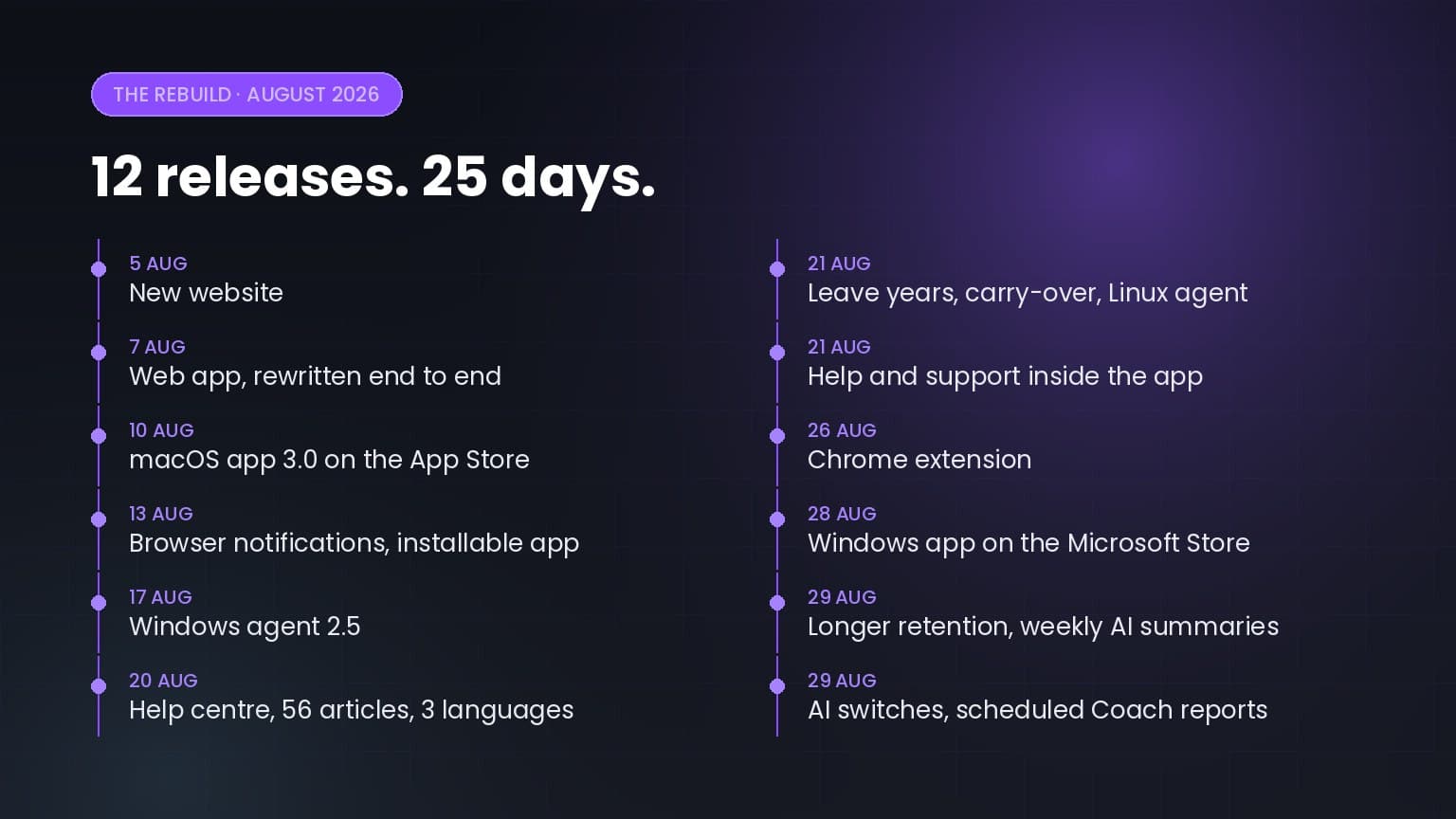
Twelve releases in twenty-five days: a rewritten web app, apps for macOS, Windows, Linux and Chrome, a help centre in three languages, and a…

5+ up-to-date statistics on hybrid and remote work productivity, RTO mandates, employee monitoring, burnout, and where the workday actually goes in…
Worktivity turns the activity your team already generates into a picture you can act on: automatic time tracking, productivity scores and payout-ready reports.
Free 14-day trial. No credit card required.